How to Clean a Phone Charging Port Safely and Bring Back a Solid Connection
To clean a phone charging port, power the phone off and gently loosen packed lint with a wooden or plastic toothpick, then flush the debris out with a short burst of compressed air held a few inches away. Here is how to clean a phone charging port, step by step, without scratching the tiny gold contacts inside.
Most charging problems are not a dead battery or a broken cable. They are a plug of pocket lint pressed against the far wall of the port, holding the connector a millimeter short of the pins. Clear that plug and a loose, unreliable connection usually snaps back to normal.
Signs the Port Is Dirty, Not Broken
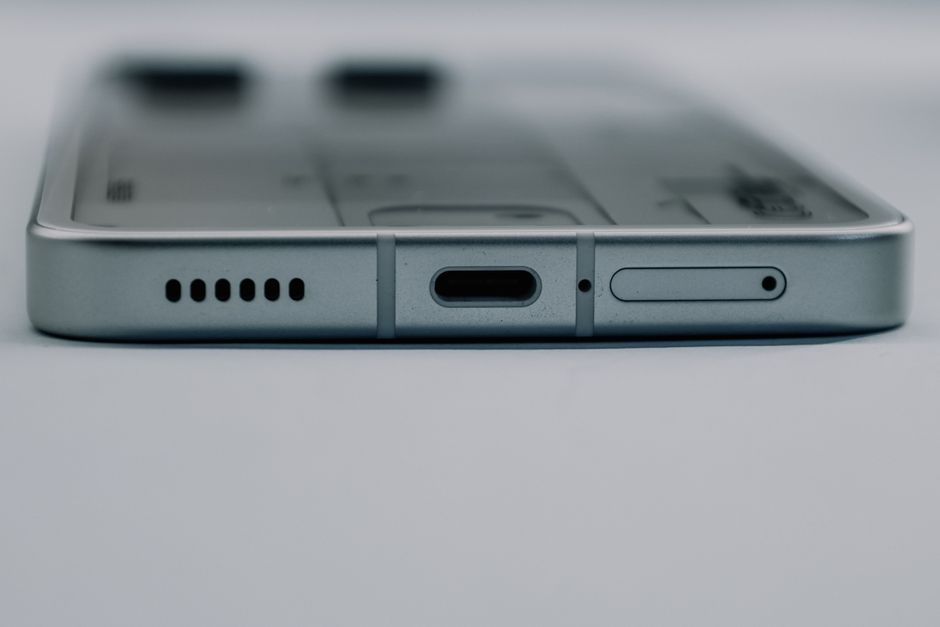
A dirty port has a few tell-tale symptoms. The cable feels loose and wiggles instead of clicking in. Charging starts only at a certain angle, or stops the moment you set the phone down. You may also see the battery icon flicker between charging and not charging.
Before you open anything up, rule out the easy causes. Try a second cable and a different wall adapter, since a frayed cable mimics a dirty port. If a known-good cable still sits loose, the port itself needs cleaning.
Tip: Shine a phone flashlight straight into the port and look inside. A grey or fuzzy plug near the back is compacted lint, and that is exactly what you are about to remove.
Tools That Are Safe to Use
You do not need a repair kit. A handful of common items does the job, and the key rule is to stay non-metal so you never bridge or bend the contacts.
| Tool | Use it for | Avoid because |
|---|---|---|
| Wooden or plastic toothpick | Loosening packed lint | — |
| Compressed air | Blowing debris out | — |
| Soft anti-static brush | Sweeping loose dust | — |
| Metal pin or needle | Nothing | Scratches contacts, risk of short |
| Cotton swab head | Nothing | Leaves fibers behind |
Warning: Never poke a metal object into the port while the phone is powered on. Metal can short the pins and cause permanent damage that no cleaning will fix.
Clean the Port Step by Step
Work slowly and in good light. The whole process takes about five minutes.
- Power the phone off and unplug it from any cable. A powered-down phone removes any risk of shorting a contact.
- Look inside with a flashlight to find the lint plug and see how deep it sits.
- Insert a toothpick gently along the bottom wall of the port, where lint collects, and drag outward. Keep the tip flat and avoid pressing on the row of pins.
- Scrape and pull in short strokes. Lint usually comes out as a single grey clump. Repeat until nothing more lifts.
- Blow out the loosened debris with a short burst of compressed air, holding the can upright a few inches away so no liquid propellant sprays in.
- Sweep the opening with a dry anti-static brush to catch any stray dust around the edges.
- Power on and test with your cable. It should seat with a firm click and hold at any angle.
If charging is still flaky after a thorough clean, the port may have a bent pin or a failed solder joint, and that is a repair-shop job rather than a cleaning one.
Keep It Clean Longer
A little prevention saves you from doing this every month. Lint gets into the port from pockets and bags, so a few habits cut down how fast it builds up.
Keep the phone in a pocket without loose thread, or use a case with a port flap. Empty pocket lint regularly. If you charge overnight, a wireless charging pad keeps the physical port empty and untouched, which is the surest way to avoid buildup entirely.
Check the port every couple of months with a flashlight. Catching a thin layer early means a ten-second brush instead of a full cleaning session.
It also helps to be gentle with the cable itself. Yanking the cord at an angle slowly widens the port and loosens the fit, which people often mistake for a dirt problem. Pull the connector straight out by the plug rather than the wire, and the port stays snug for years.
Note: Skip liquids. Alcohol and water can seep under the contacts and cause corrosion, and the port almost never needs anything wet to come clean.
Frequently Asked Questions
Can I use rubbing alcohol to clean the port? It is best avoided. The contacts are delicate and a liquid can pool under them and corrode the metal. Dry cleaning with a toothpick and compressed air handles nearly every case.
Why does my charger only work at a certain angle? That angle is the last position where the cable still reaches the contacts past a lint plug. Once you clear the debris, the cable should charge at any angle again.
Is compressed air safe for a charging port? Yes, as long as you hold the can upright and a few inches back so it releases air and not liquid propellant. A short burst is enough.
How often should I clean my charging port? For most people, once every couple of months is plenty. Check it with a flashlight and only clean when you actually see buildup.
Could cleaning damage my phone? Only if you use metal or force. Stick to a wooden or plastic pick with the phone powered off, work gently, and the risk is essentially zero.